- Developer
- Vector Unit
- Installs
- 100M+
- Downloads
- 0
- Views
- 1
- Updated
- Nov 6, 2026
Screenshots
About Beach Buggy Racing
Beach Buggy Racing: A Great Kart Racer Hiding Behind Five Tickets
Updated November 2026 · Written by the NovaRunway editorial team
Quick Verdict
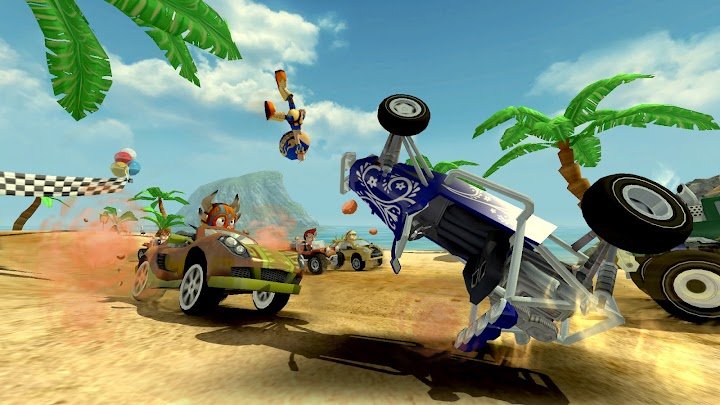
Beach Buggy Racing is the closest thing mobile has to a proper Mario Kart clone, and it is still receiving content updates more than a decade after launch. The driving is physics-driven rather than on-rails, the 25+ power-ups are genuinely chaotic, and it is one of the very few kart racers on Android with local split-screen for up to four players. But the free version is not really free: it runs on a ticket system that caps you at five races, and it carries adverts. The $3.99 one-time unlock removes the ads, disables tickets entirely, opens split-screen and adds extra championship content — and it is the single best purchase decision on this page. Buy that, and you have a premium offline kart game for the price of a coffee. Skip it, and you have a demo with a queue. The other thing to know is that the AI rubber-bands aggressively, which is the most common gameplay complaint and not something money fixes.
What Beach Buggy Racing Actually Is
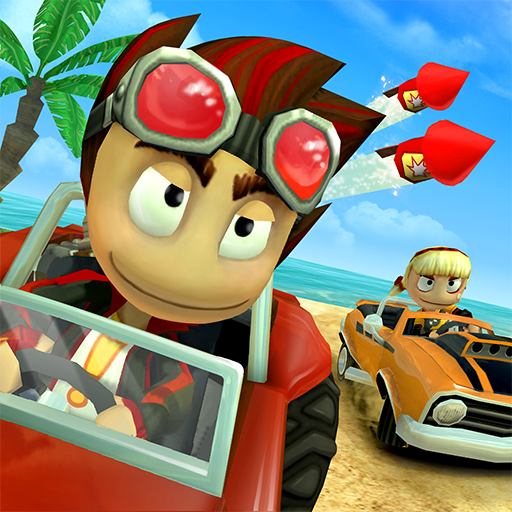
Beach Buggy Racing is a kart racer from Vector Unit, released in September 2014 as the follow-up to Beach Buggy Blitz. You race a field of rival drivers across tropical islands, jungles, volcanoes and swamps, using power-ups to fight your way to the front.
It is structured as a single-player career rather than a live-service platform. The main mode is eight championship series, each ending in a duel against a rival character; beat them and you unlock both the character and the next series . Alongside that there is a standard championship mode and a set of daily challenges that require specific characters, cars or tracks .
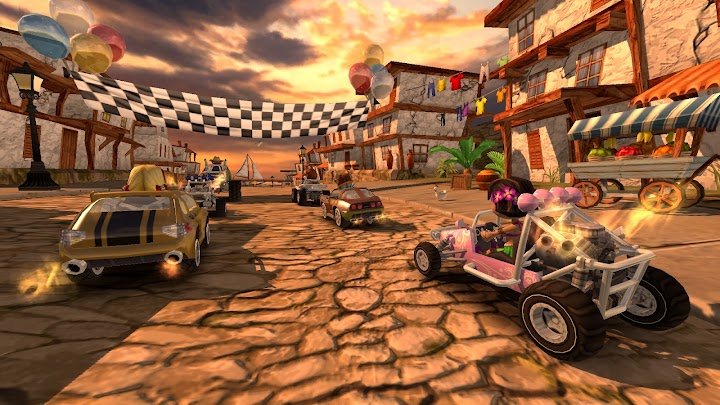
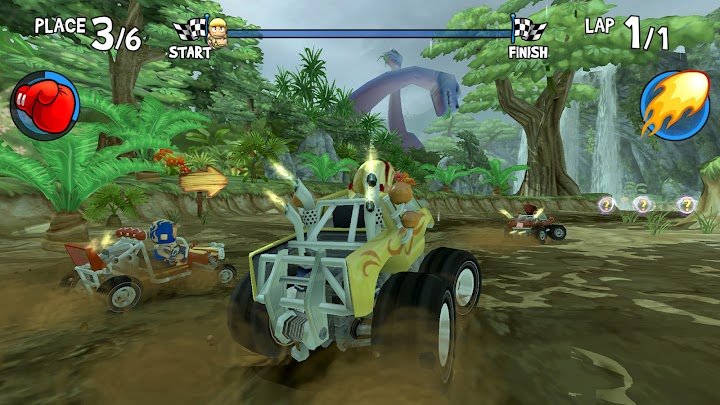
The content numbers are modest but well-used: 15 tracks, over 25 power-ups, and a garage of vehicles running from dune buggies to monster trucks, muscle cars and lunar rovers . The tracks hide shortcuts and environmental hazards, and reviewers note that the environments actively affect the racing rather than just decorating it .
It has been downloaded over 100 million times, holds a 4.5-star rating from roughly 2.9 million reviews, and — unusually for a 2014 mobile game — is still being updated, with recent builds adding new vehicles and SDK maintenance .
The Ticket System: What "Free" Actually Means
This is the mechanic that shapes everything, and it is not obvious until you hit it.
Every race costs a ticket. You can hold a maximum of five. Tickets regenerate slowly over time, and you earn one back by getting a three-star rating on an event . Win a race and the ticket is refunded, so a competent player can keep racing without ever running dry .
Two details make this less punitive than it sounds. First, the ticket is refunded on a win, which means the system punishes losing rather than playing. Second, restarting a race is free, so you can retry a track indefinitely without spending another ticket . That is a notably generous version of an energy system, and it is the reason reviews describe the free experience as annoying rather than blocked.
The catch is that the ceiling is real. If you hit a difficult series and lose repeatedly, you will run out of tickets and be told to wait. That is the moment the game is designed to convert you.
The $3.99 Unlock: Why It Changes Everything
The free version monetises through a combination of adverts and in-app purchases, and the single most important one is a $3.99 unlock that does four things at once:
- Removes all advertising.
- Disables the ticket system entirely. Unlimited races, no waiting.
- Unlocks local split-screen multiplayer for up to four players.
- Adds extra championship content.
That combination effectively converts the free-to-play version into a premium game. It is not a cosmetic purchase or a shortcut — it removes the two systems that make the free version feel like a trial, and it turns on the feature that most distinguishes the game from its competitors. One reviewer described it in exactly those terms: the unlock “almost creates a premium game experience” .
Regional pricing varies, and it is worth checking your local listing — but at roughly the price of a sandwich, it is one of the clearer value propositions in mobile gaming. If you play for more than a couple of hours, buy it.
There is also a way to skip the purchase entirely: Beach Buggy Racing is included in Google Play Pass, and the Play Store listing states that subscribers get the game without ads and without in-app purchases . If you already subscribe, check the catalogue before spending anything.
The Rubber-Banding Problem
This is the game's most consistent gameplay criticism, and it needs to be stated plainly because it affects every race.
The AI opponents scale to your performance. They are not fixed-difficulty rivals; they adjust to keep the race close. In theory that keeps things exciting. In practice, it means a well-driven race can still be lost in the final straight because the CPU has closed a gap it should not have been able to close.
Player reviews describe this in strong terms — one Chinese-language review complains that the AI moves faster than a near-fully-upgraded vehicle and effectively ignores the car you spent currency unlocking, which makes the whole upgrade system feel pointless . A review aggregation of the game's ratings lists “unfair CPU/AI advantage” as one of the four most common drawbacks, alongside performance lag, handling issues on certain maps, and monetization concerns .
The counter-argument, made by players who defend the game, is that the AI is programmed based on player data and that the balance is deliberate — you lose when you deserve to lose . That is a fairer reading of the design intent, but it does not change the experience: when the game decides a race should be close, it will be close, regardless of how well you drove the first two laps.
Tracks, Power-Ups and the Garage
The 15 tracks are the game's strongest asset, and the reason is variation rather than volume. A jungle with dinosaurs, a lava-spewing volcano, a beach and a swamp all drive differently, and the environments affect the racing rather than just the scenery . Shortcuts are hidden and learnable, which rewards repeated runs.
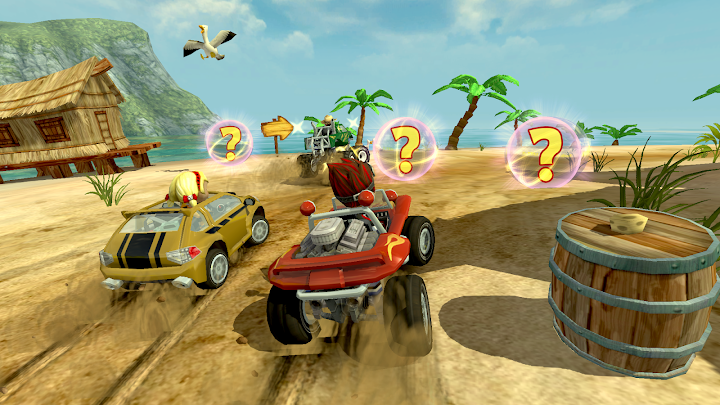
The power-up roster is where Beach Buggy Racing separates itself from its sequel and from most competitors. There are over 25, including Dodgeball Frenzy, Fireball and Oil Slick, and they are unlocked with gems rather than coins — which means the power-up pool grows more slowly than the car pool . Reviewers have noted the item count is close to four times what Mario Kart offers , which sounds like marketing until you play it and realise how much of the race outcome is decided by what you are carrying.
The garage is coins-based for cars and upgrades, which is the fairer half of the economy. Each vehicle handles differently enough that switching matters, and cosmetic tweaks let you personalise without spending.
The honest limitation is that 15 tracks gets repetitive. Reviewers say so directly, and it is the price of a game from 2014 rather than a live-service racer with seasonal content. The championship structure and daily challenges stretch the content, but they do not multiply it.
Split-Screen: The Feature Nobody Else Has
Local split-screen for up to four players is the reason to own this game rather than a prettier alternative. It works on Android TV or a TV-connected phone or tablet, requires controllers for each player, and is unlocked by the $3.99 purchase .
Screen space is divided evenly, which keeps each player's view usable during busy moments , and multiple controllers are recommended for smooth play. This is a genuinely rare feature — one review describes Beach Buggy Racing as “the only local multiplayer kart racer on mobile” , which is close enough to true to be worth repeating as reviewer opinion rather than fact.
On a phone, split-screen is impractical. On a TV with four controllers, it is the closest mobile gets to a console kart night.
Controls, Offline Play and Technical Notes
Controls are flexible in the way a good mobile racer should be: tilt, touch, and USB or Bluetooth gamepad, switchable at any time . Tilt steering is the natural fit on a phone, and the graphics settings can be adjusted to prioritise performance or visual quality. Reviews describe the driving as responsive and dynamic across sand, dirt and pavement .
Offline play is a genuine strength and worth confirming: single-player and local play do not require a connection . Online features — Google Play Games leaderboards, achievements and cloud save — do need one . One aggregator site claims the game cannot be played offline , which contradicts the developer's own listing and multiple other sources; treat that as an error and assume offline works for everything except leaderboards and cloud sync.
Requirements are modest but not trivial: current builds list Android 7.0 or later, targeting Android 16 . Older devices running Android 4.4 are excluded by newer builds even though the game itself is lightweight.
Performance is generally solid, but not flawless. Reviews cite lag spikes as the most common technical complaint , and handling issues are reported on certain maps — Paradise Beach is named specifically . The game is a decade old and runs on a wide hardware range; on modern phones it is smooth, on older ones expect occasional stutter.
Beach Buggy Racing or Beach Buggy Racing 2?
This comparison matters more than any feature list, because the sequel is the obvious alternative and it is a different deal.
| Beach Buggy Racing (2014) | Beach Buggy Racing 2 | |
|---|---|---|
| Monetisation | Ads + tickets, removed by a $3.99 unlock | Heavier ad load; purchasing any item removes ads permanently |
| Offline | Yes, single-player and local play | Online-first; offline play is a frequent request in reviews |
| Multiplayer | Local split-screen (unlock required) | Online racing focus |
| Content | 15 tracks, 25+ power-ups | Wider tracks, deeper car customisation |
| Balance | Simpler, more contained item set | Reviewers describe it as overloaded with systems |
The short version: the first game is the cleaner experience. It is offline-capable, its monetisation has a single clear off-switch, and its content is finite in a way that respects your time. The sequel is more ambitious and more aggressively monetised, and reviewers who prefer the original tend to cite exactly that — one player put it bluntly: “compared to 2, 1 is far better” .
If you want online racing, the sequel is the only option. If you want a kart game you can play on a plane and finish, this is the one.
Beginner Tips for Beach Buggy Racing
- Buy the $3.99 unlock before you need it. Waiting until the tickets annoy you means you have already played the worse version. The unlock is the actual product.
- Check Google Play Pass first. If you subscribe, the game may already be free of ads and purchases for you. Check the catalogue before spending.
- Three-star events to farm tickets back. A three-star rating refunds a ticket, so replaying an easy event you have already mastered is a reliable way to top up.
- Restart freely — it costs nothing. Restarting a race does not consume a ticket, so a bad start is never worth playing out.
- Save gems for power-ups, not cosmetics. Power-ups are gem-gated and change race outcomes; cosmetic tweaks do not. This is the one place where the premium currency genuinely matters.
- Learn one shortcut per track. The tracks hide shortcuts that save real time. Learning one per track is worth more than upgrading a car.
- Do not over-invest in a single car. The AI scales to your performance, so a fully upgraded vehicle does not guarantee easier races. Spread upgrades across a few cars instead.
- Play with tilt on a phone, gamepad on a TV. Tilt is the natural fit for handheld; split-screen on a TV needs controllers for everyone.
- Accept the rubber-band. If a race is close in the final lap, it is designed to be. Do not read a last-corner loss as evidence your driving was bad.
Pros and Cons
| Pros | Cons |
|---|---|
| $3.99 unlock removes ads, tickets and adds split-screen — near-premium value | Free version caps you at five tickets and shows ads |
| Genuine physics-based driving, not on-rails karting | AI rubber-bands aggressively; races are kept close artificially |
| 25+ power-ups, the deepest item set in mobile karting | Only 15 tracks; repetition sets in |
| Local split-screen for up to four players | Split-screen requires the unlock and multiple controllers |
| Fully offline for single-player and local play | Lag spikes and map-specific handling issues reported |
| Still receiving updates 12 years after launch | Requires Android 7.0+, excluding older devices |
| Included with Google Play Pass where available | Sequel has more content, though heavier monetisation |
Who Should Play It
Play it if you want a proper kart racer on Android that works offline, supports local multiplayer, and has a single clear purchase that ends the monetisation. It is especially good for families with a TV-connected device and controllers, and for anyone who wanted Mario Kart on mobile and found the alternatives too online-dependent or too aggressive with ads.
Skip it if you refuse to pay $3.99 and expect the free version to be a complete game — it is not, and the ticket system will stop you within an evening. It is also worth skipping if rubber-banding AI ruins racing games for you, because this game leans on it heavily, or if you want a long tail of fresh content: 15 tracks is the package.
Consider the sequel instead if you specifically want online racing. Accept that it is more heavily monetised and less offline-friendly, and read recent reviews before committing .
Frequently Asked Questions
Is Beach Buggy Racing free?
It is free to download and play, monetised through adverts and in-app purchases. The free version uses a ticket system that limits you to five races at a time, with tickets regenerating over time.
What does the $3.99 unlock include?
It removes all ads, disables the ticket system entirely, unlocks local split-screen multiplayer for up to four players, and adds extra championship content. It is a one-time purchase, and regional pricing varies.
Does it work offline?
Yes. Single-player and local play work without a connection. Google Play Games leaderboards, achievements and cloud save require one.
How does the ticket system work?
Each race costs one ticket, and you can hold a maximum of five. Tickets regenerate over time, and earning a three-star rating on an event refunds one. Winning a race also refunds the ticket, and restarting a race costs nothing.
Why does the AI always catch up?
The opponents scale to your performance to keep races close. This is deliberate design rather than a bug, but it is the game's most common gameplay complaint — a well-driven race can still be lost on the final straight.
Can I play split-screen on a phone?
Split-screen is intended for Android TV or a TV-connected phone or tablet, and requires controllers for each player. It is unlocked by the $3.99 purchase. On a phone screen it is impractical.
Is it better than Beach Buggy Racing 2?
They are different deals. The first game is offline-capable, has a single clear monetisation off-switch, and a contained item set. The sequel has more content and online racing but heavier monetisation. If you want offline play and local multiplayer, the original is the better fit.
What Android version do I need?
Current builds require Android 7.0 or later. Older Android 4.4-era devices are excluded by newer releases.
Is it on Google Play Pass?
Yes. The Play Store listing states that Google Play Pass subscribers can play the game without ads and without in-app purchases. Check your regional catalogue before buying the unlock separately.
Is it suitable for children?
The racing is cartoonish and non-violent, the controls are simple, and the game is rated for everyone. The considerations are the adverts and in-app purchases in the free version — which is another argument for buying the $3.99 unlock and being done with it.
Availability and Pricing
Beach Buggy Racing is developed and published by Vector Unit. It is free to download on Android with adverts and in-app purchases, including a one-time $3.99 unlock that removes ads, disables tickets and enables split-screen. It is also included in Google Play Pass where available.
Before installing, check the current store listing for the price of the unlock in your region, the Android version requirement, and whether Play Pass covers it in your country.
Official site: vectorunit.com
Support: support@vectorunit.com · vectorunit.com/support
Disclosure: NovaRunway is an independent app and game discovery site. We are not affiliated with, endorsed by, or sponsored by Vector Unit or any Beach Buggy Racing publisher. All trademarks and intellectual property belong to their respective owners. This article reflects our editorial assessment based on the current Android build and publicly available player feedback, and is provided for informational purposes. Pricing, ad frequency, content and technical requirements may change — verify with the official store listing before downloading or purchasing.